Pandoras Box (Coolux/Christie/Twoloox)

Christie Pandoras Box is a comprehensive software solution for real-time video processing and show control applications. It offers advanced features for creating interactive multimedia experiences.
Integration
Section titled “Integration”- DirectX .x-Files Support: The Pandoras Box supports the importing of DirectX .x-files, which are created by VIOSO6.
- Blendmaps Import: Blendmaps exported by VIOSO 6 can be imported into Pandoras Box, allowing seamless integration of complex projection setups.
Demonstration
Section titled “Demonstration”The following video demonstrates the process of calibration and importing DirectX .x-files and blendmaps into Christie Pandoras Box:
Troubleshooting
Section titled “Troubleshooting”As Pandoras Box evolves on its own pace, there might be issues when working with such external warp and blend files. If you run into issues, please check these measures:
Pandoras Box not applying the warp&blend correctly
Section titled “Pandoras Box not applying the warp&blend correctly”There might be an issue with the format of the warp mesh. VIOSO 6 uses a triangulation, that Pandoras Box might not be able to process.
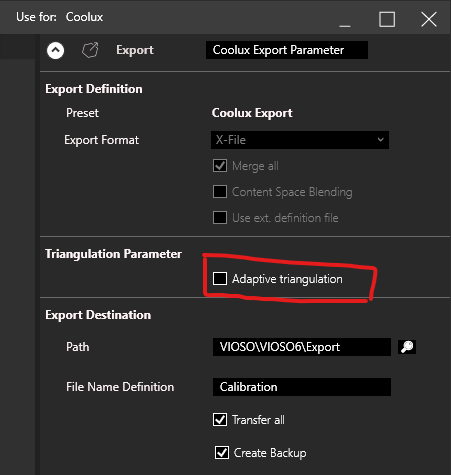
- In Project Mode:
Make sure to uncheck “Adaptive Triangulation” in the Export Node of the project design:
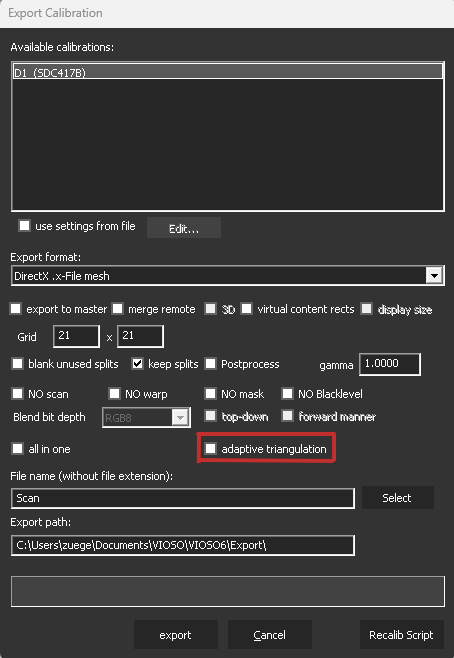
- In Free Mode:
Make sure to uncheck “Adaptive Triangulation” in the Export Settings:
- Global Setting for all exports
To set VIOSO 6 back to the old triangulation for any kind of export (caution!), you can make a change in the VIOSO 6 program settings:- Open
C:\Program Files\VIOSO6\SPeASY.ini - Seach the Parameter
bUseNewTriangulationand set to"0" - Restart VIOSO6 and run the Export again
- Open
Pandoras Box running on Mosaic or display expanders or matrixes
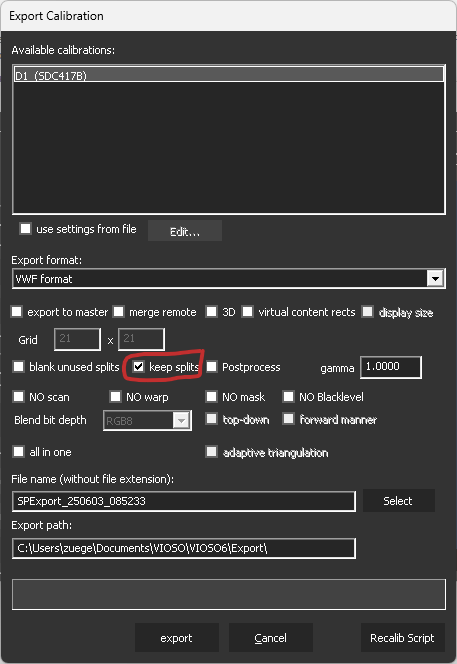
Section titled “Pandoras Box running on Mosaic or display expanders or matrixes”If running in free mode, make sure, keep splits is activated: